Provisioning a new Docassemble Repository
Introduction
Use this procedure when 'copying' a repository of existing code from another repository into the Digital Law Lab so we can work on it.
Clone the Repository
Instructions on creating a package from scratch
Where we work on existing code (eg: code from LLAW3301 repo) we do not create a fork. Instead we should mirror the repository into our Organisation.
Steps:
Create a new repository in Digital Law Lab using our Repository Naming Standard via the web browser
Eg: we use the web browser to create a repo called docassemble-CLCSA01ServiceDirectory
Do a single branch clone of the existing repository (command-line)
git clone --single-branch https://github.com/LLAW3301/docassemble-LLAW33012020S2P06.git 'docassemble-CLCSA01ServiceDirectory'
This copies only the HEAD of the main/master branch. It also renames the repo to fit with our naming standards.
Change into that directory
cd docassemble-CLCSA01ServiceDirectory
Remove the remote origin and addd the new remote origin (ie: our new repository)
git remote rm origin
git remote add origin https://github.com:Digital-Law-Lab/docassemble-CLCSA01ServiceDirectory.git
The above example assumes you're accessing GitHub via HTTPS, which you
most likely are if you're using Windows and PowerShell as per the setup guide.
However, if you are using Git Bash or Linux (on WSL or otherwise) then you may want
to use the ssh syntax ie: substitute https://github.com/Digital-Law-Lab with
git@github.com:Digital-Law-Lab
Set main as the Main Branch
Some older LLAW3301 repositories have a main branch called master. GitHub
now use main as the main branch, so master should be renamed to main for
consistency across all repos.
git branch -M main
Push to GitHub
git push -u origin main
Update the Package Info
Once the repository has been cloned we leave the main branch alone and create and
work on the next branch as per the Code Branching Policy.
Create the Working Branches
- create a
nextbranch frommain(more on why below) - check out
nextand make these changes:- Rename
docassemble/old_package_nametodocassemble/new_package_name - Edit
setup.pyand replace all occurences ofold_package_namewithnew_package_name - find the .yml file that is used to run the app and rename it to
main.yml
- Rename
- commit changes to
nextand push - pull
nextinto Docassemble Playground and confirm package still runs
In the example we've used in this document old_package_name would be LLAW33012020S2P06 and new_package_name would be CLCSA01ServiceDirectory.
Create working branch structure
This should be done in accordance with the Code Branching Policy.
- Make sure
nextbranch exists, otherwise create it as per above. - Users should work on their own branches and those branches should be named consistent with the Code Branching Policy.
Push the new branch(es) to GitHub
If you've created next_aaaa branches for other users then push these up to GitHub
git checkout branch_name
git push
Grant access to the repo
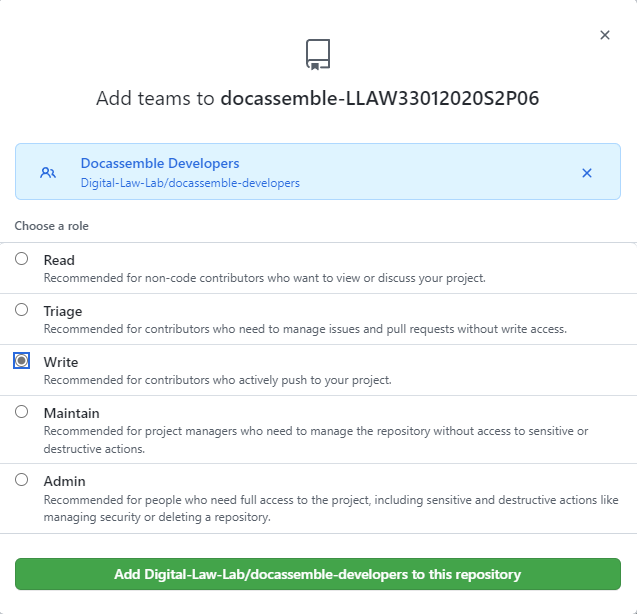
Grant write access to Digital-Law-Lab/docassemble-developers group eg:
Create Google Drive Folder
Each repo should have a Google Drive folder in the root Google Drive folder.
Create a google drive folder in the root folder. The folder name should be identical to the Docassemble package name (or repository name if the repository is not a Docassemble package).
All Docassemble packages should have a Google Drive folder created. The folder is optional for other packages
Configure Slack
On our Slack create a new channel for this repository.
Create the Channel
Channel naming convention is as per the Slack Channel Standard ie:
- Use the same name as the repo but omit the
docassemble-portion for docassemble packages - Package name should be in lower case (as Slack only allows for lower-case channel names)
Example
The channel for the docassemble-CLCSA01ServiceDirectory is called clcsa01servicedirectory
Pin Information
Slack allows for links to be pinned as bookmarks
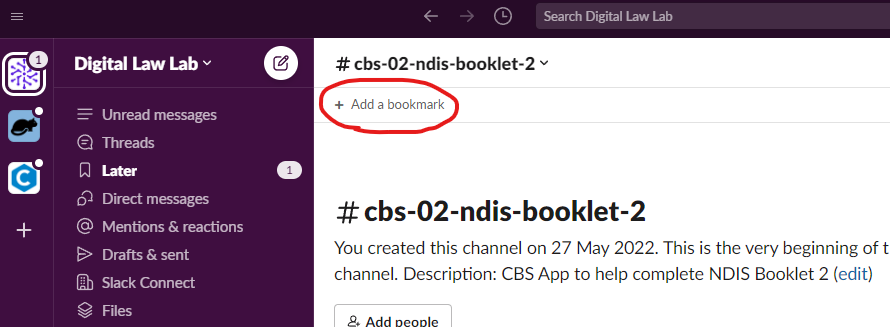
The following should be pinned as bookmarks:
- Link to GitHub repository
- Link to Google Drive repository folder you just created