Clone Repositories
Clone the Digital Age repo
Now it's time to clone your first repo. You should start with cloning Digital Law Lab. That's where we keep the tools for the Code Lifcycle
- Click on this Digital Law Lab link
- Click on
 and then click on the copy icon to copy the URL to the repo: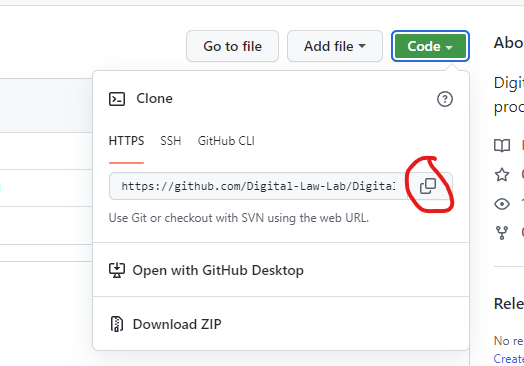
- Now clone the repo into your new Software directory
(hint: you can type
git cloneand then press Ctrl-V to paste in the URL you just copied above)cd $home\Software
git clone https://github.com/Digital-Law-Lab/Digital-Law-Lab
Clone a Docassemble repo
All Docassemble repos start with docassemble-. Find one of those and clone it to your Software directory using the instructions above.
Set up a Docassemble Project
- In your Docassemble Playground, create a 'Project' for the repo you just cloned. You need one project for every repo you clone.
- A good idea is to match your Playground Project name with your cloned repo. So, if your docassemble repo is called
docassemble-PackageName, then you should call your Playground Project 'PackageName'.
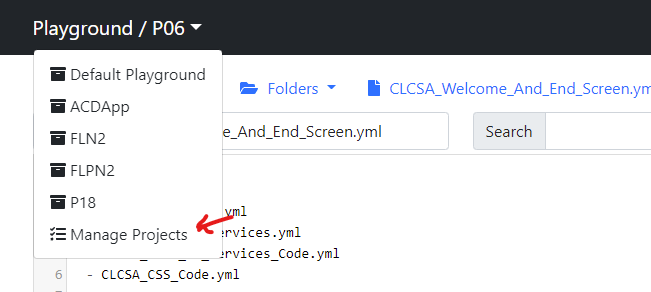
- Select 'Manage Projects' from here:
- Select 'Add a new project'
- Type in the name
- Click on 'Save'
Now you have your first Project read to go!